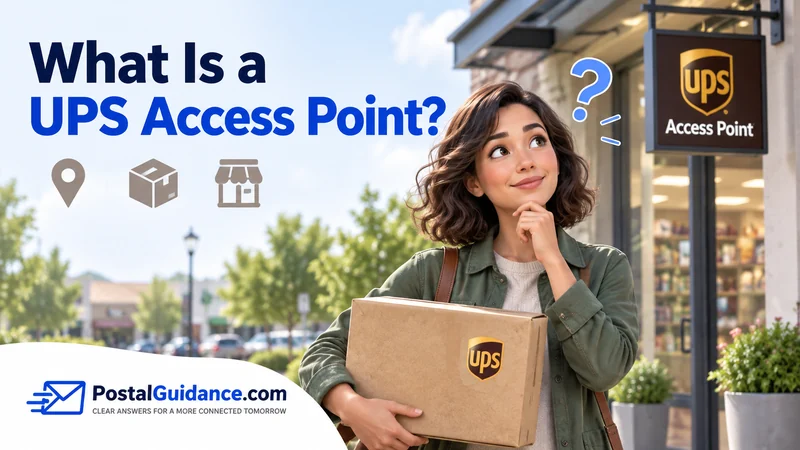
A UPS Access Point is a local business that holds packages for pickup or accepts them for shipping. Think of a convenience store or a pharmacy. It is not a UPS owned building, just a counter or locker bank inside someone else’s store.
Shippers use a UPS Access Point to reroute a delivery away from a doorstep. Recipients use one to collect a package on their own schedule instead of waiting for a driver.
The idea itself is simple. The rules around pickup, ID, and how long a package waits are not always obvious. This guide covers all three.
What a UPS Access Point actually is
Picture a grocery store, a gas station, or a local pharmacy. Most keep a small counter or a bank of lockers near the entrance. That is a UPS Access Point in most neighborhoods.
The host business is not owned or staffed by UPS. It simply agreed to hold packages as a side service. In exchange, the arrangement brings foot traffic from people picking things up.
Some locations use a self service locker with a touchscreen kiosk. Others use a staffed counter where an employee hands you the package directly after checking ID.
How pickup works
You get an email once your package reaches the location. That message includes the address, the hours, and exactly what identification you will need to bring.
At the counter or kiosk, UPS accepts one of a few identification options. A photo ID with a matching name and address works in most cases.
If your ID address does not match, bring a current utility bill as proof of residency. That usually covers the gap. A shipper provided release code can also work in place of a perfect address match.
How drop off works
Outgoing packages and returns work the same locations in reverse. Bring your item, already labeled in most cases, to the counter or locker bank during open hours.
Some Access Points can also print or attach a label from a QR code, similar to a full UPS Store. This service varies by host business though.
Weight and size limits apply too, since these are not full shipping centers built for oversized freight.
How long a package waits before being sent back
In the United States, UPS holds an uncollected package at an Access Point for 7 calendar days. After that window closes, the package heads back to the original shipper.
That timeline comes directly from UPS’s own shipping terms for this service. It applies regardless of which host business is holding your package. Some shippers can request a different window, though any change is entirely at UPS’s discretion.
Do not wait until the last day if you can help it. A package returned to the shipper usually means starting the entire shipment over.
What an Access Point cannot handle
A handful of shipment types get routed away from Access Point delivery automatically. Packages that require an adult signature are one example, since a locker or a casual retail counter cannot verify age the way a driver can.
Hazardous materials, firearms, and several other restricted categories are excluded too. High value shipments also fall outside the program in most cases, since these locations are not built for that level of security.
If a package does not qualify, it defaults back to standard doorstep delivery instead. There is no way to force a restricted shipment into an Access Point after the fact.
Access Point versus UPS Store versus Customer Center
| Location type | Who runs it | What it offers |
|---|---|---|
| UPS Access Point | An independent local business | Pickup and drop off only, no printing or packing |
| The UPS Store | An independent UPS franchisee | Full service, including getting a label printed at a full service UPS Store |
| UPS Customer Center | UPS itself, company owned | Commercial pickup, freight, and account services |
An Access Point is the lightest weight option of the three. It exists purely to move a package between UPS and a person. There is no packing or printing service, unlike a full location.
ID rules in plain terms
UPS explains the exact identification requirements on its own ID requirements page. The short version covers four accepted paths.
A matching name and address on a government photo ID is the cleanest option. A matching last name plus proof of residency works when the address is slightly off.
A matching name or address alone, backed by the tracking number, is another accepted path. A photo ID plus a shipper provided release code rounds out the fourth option.
When Access Point hours actually matter
The host business sets its own hours, not UPS. A UPS Access Point can sometimes be reachable when a standard UPS location is closed. Our guide to UPS Sunday hours for pickup counters explains why this narrow exception exists.
Do not assume every Access Point follows the same schedule though, since host businesses vary widely. Our guide to checking today’s UPS holiday schedule is worth a look around any federal holiday.
Franchise hours can also shift the picture for label services nearby. Our guide covering UPS Store closing times that vary by franchise is a useful companion. Check it if your package needs a fresh label rather than a pickup.
Redirecting a delivery to an Access Point
A shipper can build an Access Point into the label from the start. A recipient can sometimes reroute a package after the fact too, through UPS My Choice, before the driver actually attempts the doorstep delivery.
Once a package is out for delivery to your home, redirecting it usually stops being an option. Set the Access Point earlier in the process if you know in advance that you will not be around to receive it.
The bottom line
A UPS Access Point is a convenient middle option between a doorstep delivery and a full UPS Store visit. It works well for pickup and simple drop off, on a schedule that often beats waiting for a driver.
Just remember the 7 day clock, bring matching ID, and check the specific host business hours before you go. Those three details cover almost every question people have about how a UPS Access Point actually works.